Description
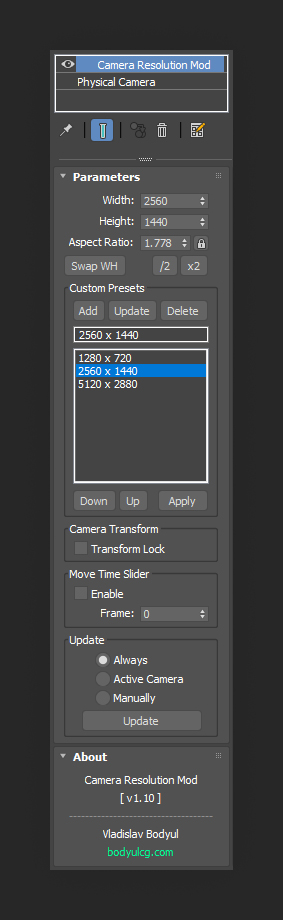
Camera Resolution Mod is a 3ds Max modifier that allows you to set render resolution individually for each camera. Key features include saving custom presets, locking camera transforms, and defining the active frame for the time slider, giving you full control over camera-based rendering.
Lite version limitations
Custom preset storage is not available
Documentation
View the user guide here.
Requirements
3ds Max 2010 - 2027
Installation
- Unzip the archive
CameraResolutionMod.zip. - Copy
CameraResolutionMod.mseto the3ds Max 20xx\stdplugs\stdscriptsfolder. - The modifier will appear in the modifier list.
Frequently asked questions
Is the Lite version free for commercial use?
Yes, the Lite version is free for both personal and commercial use.
Which render engines are supported?
Camera Resolution Mod supports all major render engines, including Arnold, Corona, V-Ray and FStormRender.
Does it support Batch Render?
No, Batch Render is not supported. Camera Resolution Mod works by switching resolutions directly in the viewport when changing cameras.
Have more questions? See the FAQ for general topics including purchasing and licensing.
Support & updates
If you need assistance or have questions, feel free to reach out via the contact form.
For update requests, please include your order number.
Changelog
v1.10.2
- Fixed occasional freeze at render start.
v1.10.1
- Added support for 3ds Max 2024.
v1.10
- Added option "Move Time Slider".
- Added renaming and updating of presets.
- Fixed error "Attempt to access deleted modifier" when closing 3ds Max.
v1.07
- Added buttons for dividing / multiplying resolutions by 2.
- Added button "Swap WH".
- Added checkbox "Transform Lock".
v1.04
- Added option "Active Camera" in the update settings.
- Fixed bug with the addition of presets in older versions of 3ds Max.
- Fixed bug where the resolution in the Render Setup window was not updated after changing the parameters or applying the preset.
v1.01
- Fixed bug with resolution setting when the aspect ratio is on.
v1.0
- First version.