
Description
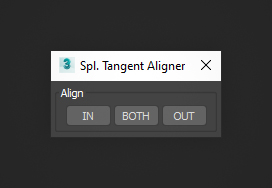
Spline Tangent Aligner is a 3ds Max macro that aligns the tangents of selected Bezier Corner knots. Use "In", "Out", or "Both" to adjust tangents: "In" aligns the incoming tangent to the outgoing, "Out" does the reverse, and "Both" averages the direction. Tangents are highlighted in the viewport for easy control, making precise spline editing faster and more intuitive.
Requirements
3ds Max 9 - 2027
Installation
- Unzip the archive
SplineTangentAligner.zip. - Drag
SplineTangentAligner.mcrinto the viewport to install the script. - Open
Customize > Customize User Interfaceand locate it underGroup: Main UI > Category: BodyulCG. - Optionally assign the macro to a hotkey or drag it onto a toolbar for quick access.
Changelog
v1.0
- First version.